Introduction
Users at all levels are able to Edit Asset Names and Colors on the Overview screen, instead of having to navigate to the Administration Tab. This allows the flexibility to turn Administration off, but allows Users the ability to change the names if needs be.
N.B. only Users with editing rights (Create) will be able to use this feature.
Enabling Asset Editing on the Overview Page
- Navigate to the Client, select Features - Overview Page, or Client Group - APPLICATION - Overview Page
- Enable ASSET EDITING

Editing the Information
To edit the Asset information:
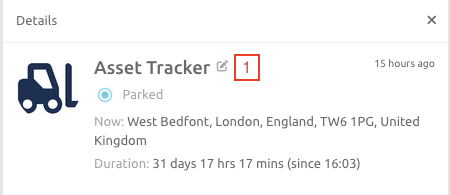
1. Hold your mouse over the Asset Name on the Overview screen. An Edit option will appear.
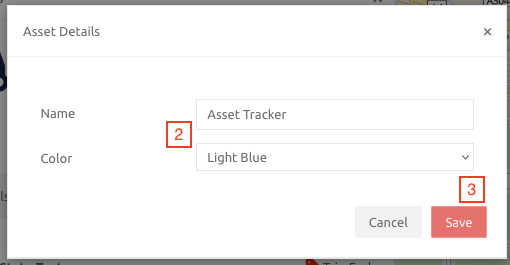
2. Edit the information needed.
3. Click the Save button
Comments
0 comments
Please sign in to leave a comment.